Classification of software (30/05/2019)

Before those lectures, I thought software was all about the external application for systems, but totally have no idea about the different types of software. Thanks to this week’s class, which proceeds to the operating system layer, focuses on the classification of software and it helped me to have a better view on the term ‘software’.

  • Hierarchy of software

Software can be further categorized as two distinct types, system software and application software, in which they are used for different purposes, as the name suggests. In class, we did some activities to try to memorize this hierarchy graph, because it is really essential for learning software. The graph of the hierarchy is shown below.

The hierarchy of software
  • System software

System software is a type of computer program that is designed to run a computer’s hardware and application programs. This can be understood as the interface between hardware and user applications. This can be broken down into four smaller categories, operating system software, utility software, library programs and translator software.

Operating system is the combination of different programs that makes computer usable and convenient for the users. It is an interface between the application software and computer, so that without operating system, all the applications won’t be able to function normally. Some examples of operating system include Windows, Linux, Mac OS.
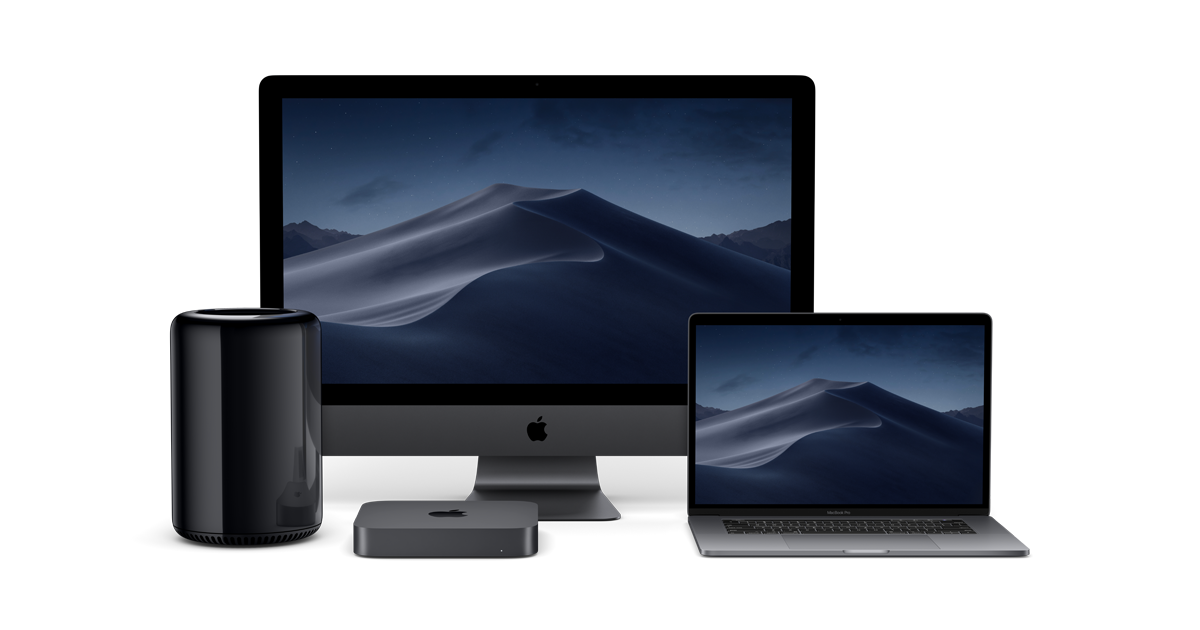
Mac OS

Utility software is usually used to maintain the smooth function of the operating system and it does not occupy much memory or CPU. For instance, virus detector (Avast), temperature monitor (Macs fan control) and as well as searching engine in the operation system (Alfred). Those examples are the one that we presented in class activities, everyone stood up to give some examples of utility software, some examples presented by classmates are activity monitor and unarchiver.

Examples of utility software

A library program is a collection of functions that can be used by other programs. It contains code and data to provide services, for instance printing, graphic engines. One specific example can be the Microsoft office, which all of their sub-applications are all looking the ‘same’ because it’s using the same interface.

Translator software, allows new programs to be written and run on the computer by converting the source code in to machine code. There are normally three types, assembler, compiler and interpreter.

Assembler is used to translate the assembly language program into machine code. The assembly language program is the low-level program. Compiler is a program that takes a program in a high-level language (e.g. python, java, c++), the source code, and translates it into object code all at once. Interpreter analyses and executes each line of a high-level language program one line at a time.
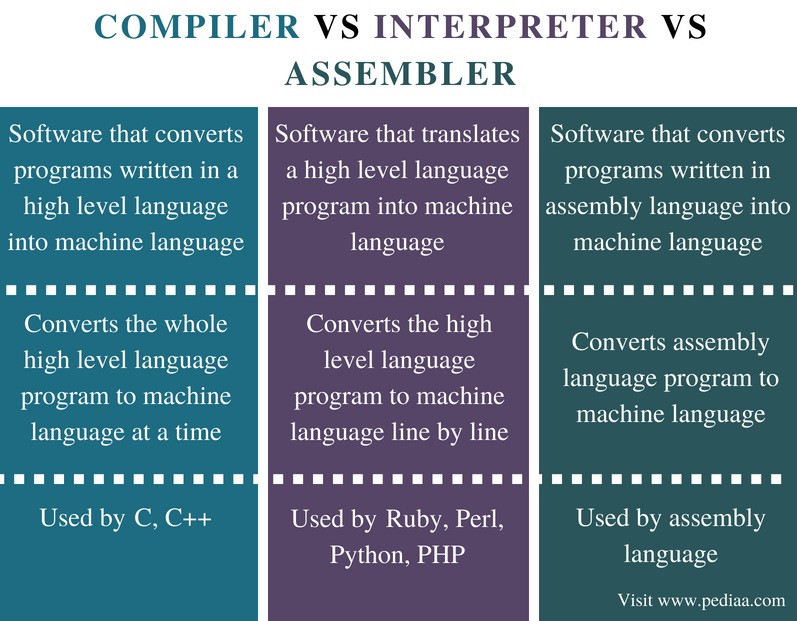
Difference between compiler, interpreter and seemlier
  • Youtube video

In class, we watched a video in regards to interpreter and compiler, the interpreter is used to ‘translate’ the instruction one by one. The process is slow, but it does have a chance to correct the mistakes in translation. Compiler, on the other hand, compiles the information together. It run much quicker, but does require a preparation time.

  • Application software

This kind of software allows user to perform non-computer tasks, which means that users use these types of applications for writing a document, making a poster, etc. And this can be further divided into general purpose application software, special purpose application software and bespoke application software.

General purpose application software, as the name suggests, can do multiply tasks, not only limited to single function. For instance, the Office word, users can use it for different purposes, like writing essay, making poster, or creating tables. Special purpose application, however, focuses on a specific function, like calculators, web browsers. Bespoke applications are those that are specifically designed for users or purposes. For instance, I’ve built a program for the automatic robot this year together with a professor, the program is specifically suited to the robot, which connects to its cameras and wheels. Other examples are software for medical uses, or for the military.

An example of general purpose application software
Special purpose application
Bespoke software
  • Flowchart poster

We choose the topic that kind of reflect IB students’ daily life, that is ‘When to do homework?”. We design the flowchart first, consider about the common situation in our daily life, and then finish up the pseudocode according to the flowchart. Here is our poster.

The poster

So in a word, this week focuses on the smaller categories of software, and it would be really helpful for me to identify those different applications in the future.
Algorithm (06/05/2019)

In this week’s class (which is really a long week), we focused on the term ‘Algorithm’ and dived deeper into this topic by introducing the properties, characteristics, expressions of algorithm.

  • Computational thinking

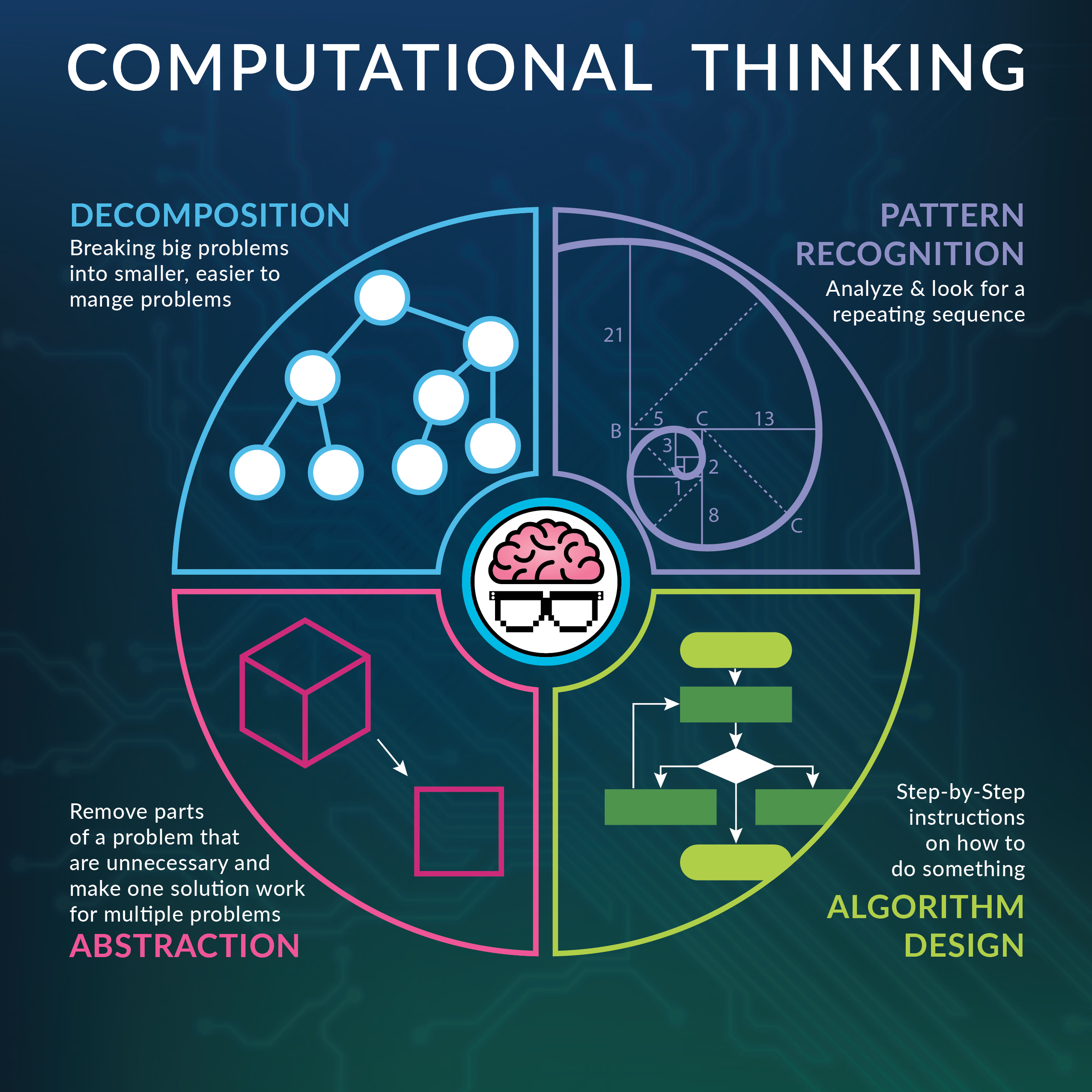
There are four parts of computational thinking: decomposition, abstraction, pattern recognition and algorithm.

Decomposition is the process of breaking down a complex problem or task into smaller parts. Abstraction is about focusing on relevant information and ignoring unimportant details, which is doing one particular thing at a time. Pattern recognition is somehow like to conclude a similarity among problems. Algorithm, which I am going to talk about next, is about listing all the possible steps in order to accomplish the goal.

Take the lightbot game as an example, we decompose and abstract the tasks into different movements, or different sections. Later on, we needed to recognize a pattern so that we can follow this ‘loop’ later on. At last, we needed the algorithm to express out all the thinking that we just done and give instructions for the robots. This game enhanced my understanding on computational thinking, and kind of built up my understanding of solving a problem logically and in step-by-step order.

Computational Thinking
  • Term ‘Algorithm’

The term ‘Algorithm’ refers to a set of well-defined instructions in sequence in order to solve the problem efficiently and effectively. 

In class, we did two activities related to algorithm to further strengthen our understanding on this term. First one is that one student act as the robot, and the other act as the system which gives the instructions to the robot. The goal for the robot is to grab the object on the desk that is few meters away. However, the eyes of ‘robot’ will be covered and ‘robot’ has to approach the object by only listening to the oral instructions, for instance ‘go forward for 1 step’, or ‘turn left for 90 degrees’, etc. Another activity is to design the most efficient way of visiting different sites in a map without missing any of them.

In-class activity
  • The characteristics of Algorithm

There are five important characteristics of an algorithm that should be considered while designing any algorithm for any problem.

  1. Finiteness

An algorithm should terminate infinite number of steps and each step must finish in finite amount of time. An algorithm that never terminates is useless since it’s impossible to know the difference between continued progress and being ‘stuck’.

2. Definiteness

This indicates that an algorithm must be explicit about how to work the computation. Definiteness comes by giving commands that state unambiguously what to do, in sequence. Some examples of the commands might be conditional and repeated sentences (loops), which requires the clear and precise directions on how to respond to different outcomes or when to stop the repetition.

3. Effectiveness

Effectiveness assures that the agent following the instructions is able to do without intervention. This is usually achieved by reducing the tasks and operations to the computer. The connection between definiteness and effectiveness is that definiteness ensures that the computer always know what to perform next; while effectiveness guarantees that the computer can accomplish the command that the user gives.

4. Input

The input is the data that will be transformed by algorithm to create the output. An algorithm must have zero or more but must be finite number of inputs. Usually when establishing an algorithm, users have to concern about the types of data, the structure of it and the actually number of the variable.

5. Output

Output is the result of the computation, or algorithm. An algorithm must have at least one desirable outcome (output).

  • Designing an algorithm and understanding the problem

It does take some process to design an algorithm. Firstly, it’s important to have a first glance of it, which is to look at it from a broad view. Before we actually start to establish the algorithm, we have to settle down the problem that we are going to solve through this algorithm. Secondly, we should be clear about the instructions in each step and be aware of the potential obstacles that we will face.

Besides, before the algorithm can be designed, it’s essential to understand the problem thoroughly. For instance, what is the desired input and output of the algorithm; what decisions have to be made in the problem and are there any repeated section of the algorithm? 

  • Expression for algorithm

After the algorithm is designed, the next thing comes up is how to express the algorithm in readable format. It’s usually displayed in four types, natural language, flowchart, pseudocode and programming language.

Natural language can also be known as a human language, in this case, is in English. It contains three steps: fetch an instruction, decode the instruction and then execute it. For instance, when you want to display a sentence ‘CS is the best subject in IB!!’ for three times, the format of natural language is simply “display the message ‘CS is the best subject in IB!!’ three times”.

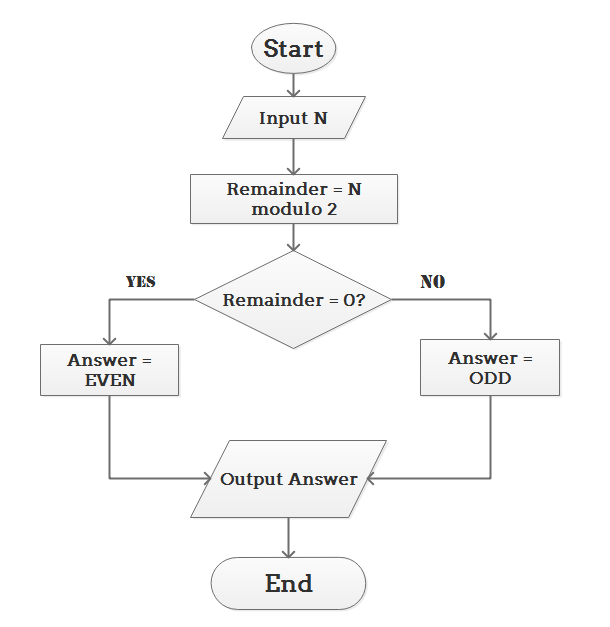
Flowchart is a formalized graphic representation to represents a workflow or process. The flowchart shows the steps as boxes of various kinds, and they’re ordered by connecting the boxes with arrows. 

Flowchart

Pseudocode is the genetic artificial language. I think it somehow performs as the combination of natural language and programming language because it’s both understandable for human beings and it’s similar to what an actual program looks like. The pseudocode is also highly related to the flowchart, and like a more visual representation of it.

Programming language is the artificial language to communicate with the computer system. Some common languages are C, Python, Java… And each of these programming languages are specified in different fields, for instance database, web data, or artificial intelligence.

Python
  • Algorithm Magic

Our group was assigned with a presentation about a ‘magic’ show, which is called ‘red black mind meld’. At the beginning of this trick, the magician and the volunteer will both have equal amounts of cards, which is 26. Later on, magician picks a random number (1-5) and colour (red or black), places that many cards in to a red or black pile as appropriate, then volunteer randomly places the same number of unseen cards in a pile in front of that pile. And finally, when we were counting the red cards in the pile in front of the red pile and black cards in the pile in front of the back pile, we found the number was same. In fact, this conclusion can be explained by using abstraction, logical thinking and algorithm. (We didn’t use zoho doc -_-)

  • The secret rules of modern living: Algorithms

—PageRank Algorithm—

This algorithm can be visually shown in a football match. The more passes a player receives, the more important he/she is. So that, the passes from a popular player, who receives a lot of passes, weighs more than other players. Google is using this type of algorithm in their searching engine. PageRank gives each page a rating of its importance, which is recursively defined measure whereby a page becomes important if important pages link to it.

PageRank Algorithm

—Bubble sort algorithm—

This algorithm functions in a way that system sort things firstly in pairs in sequence, for   instance from left to right. If the order of two numbers are wrong, then the system will swap them over to the right over. By repeating this process again and again, everything will be sorted in right order. But this type of sorting algorithm takes a longer time to accomplish compared to others. When I’m writing programs, algorithms are always a huge obstacle for me and this is the thing that I really have to improve on.

Bubble sort algorithm
  • Conclusion

We learned a lot in this ‘long’ week, for instance computational thinking and characteristics/expressions of algorithms, as well as various kinds of activities and presentations to strengthen our understanding. As soon as I got in touch with flowchart and pseudocode, I found out that those two expressions of algorithms are essential for programming because it would help me to make a clear logic sequence and know what I should do next in my programs. I think will implement those tools when I’m writing a code next time.

Lightbot certification

Inside a computer and Binary representation (07/04/2019)

In this week’s classes, we learned what is inside a computer to see how it works by going deep into the role of CPU and the binary system. To understand that better, we did two roleplaying activities to imitate how the CPU and the binary number system work. We also practiced how to convert binary to and from decimal.

  • Functions of CPU, CU, ALU, Register, and Bus

CPU stands for the Central Processing Unit which is like the brain of a computer. It fetches the instructions from the memory and calculates and processes the instruction later. As for CU, refers to the Control Unit, directs operation of the processor. It tells the computer’s memory, arithmetic/logic unit and input and output devices how to respond to a program’s instructions.ALU refers Arithmetic Logic Unit which does the calculations (arithmetic) and deals with logic in a computer by passing through different logic gates. The Register functions as a memory storage location within a CPU but it is different from the secondary storage because it can only store the information temporarily. The information will be all cleared once the computer is shut down. The Bus serves as the ‘transporter’ of messages by carring the information to communicate with other parts of the CPU.

  • How does a computer work

After learning the IPO model and the CPU, I kind of have a clearer view on how the computer works. As soon as the computer receives the instruction from the user,the subsystem sends a message to the CPU to process it. The CPU would fetch and execute these instructions from memory. Within the CPU, CU fetches information from the Register and memory and tells ALU what to do through the Bus. After ALU has done its calculations, it would send the result by the Bus to display it on your screen as the output.For instance, there are two variables and you give the instruction ‘x+3, y+4’ to the computer. The computer receives the command and directly gives it to the CPU. The CU fetches the information from the Register, and the Bus will collect the data and send the information to the ALU. After the ALU done the calculations—plus 3 to x and plus 4 to y, the bus will again carry the result to the display part. Finally, the output will be shown on the screen by display.

The input–CPU–output diagram
  • Binary number system

For two confusing terms, data and information. Data is raw, unorganized facts that need to be processed. It can be known as the ‘raw material’ for a computer to process. However, when data is processed, organized, structured or presented in a given context, it is then called information. 

Comparison between Data&Information
DataInformation
Raw materialProduct
InputOutput
Doesn’t carry a meaningCarries a logical meaning

The computers won’t use the human language, due to the fact that it is waste of their storage and time, so computers use binary number system to represent the data and process it. Binary number system expresses number with only 2 symbols: 1 and 0.

  • How to Convert Binary to Decimal
  1. Write down the binary number
  2. List the powers of two from right to left
  3. Write the digits of the binary number below their corresponding powers
  4. Add the powers which have number “1” below them
  5. The final answer is the decimal way to express the binary number

For example, for binary number 111011:

252423222120
32168421
111011

As there is the number “1” below 32, 16, 8, 2 and 1, we add them together: 32+16+8+2+1=59, which 59 is the decimal way to express 111011.

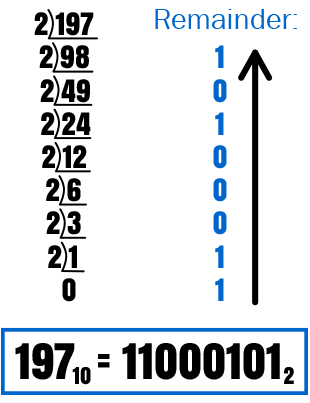
  • How to convert Decimal from Binary (Short Division)
  1. Divide the decimal number by 2
  2. Record the remainder from Step 1 as the rightmost digit.
  3. Divide the quotient of the previous by 2
  4. Repeat Step 3 and Step 4, record remainders from right to left, until the quotient becomes less than 2.
  5. Read the remainder from bottom to top
An example of short division
  • Roleplaying activities

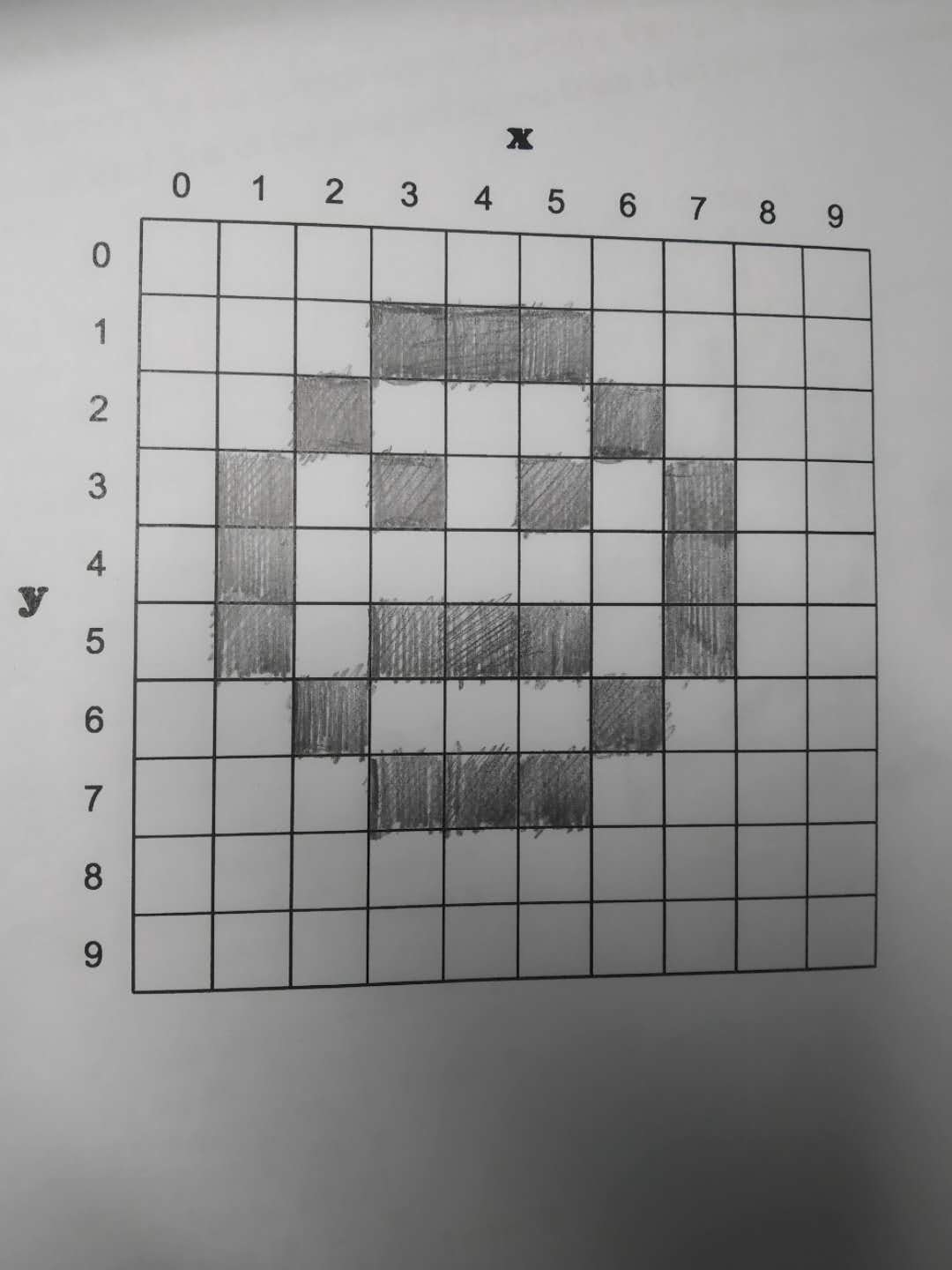
We did two roleplay activities in regard to CPU and binary system. In the first activity, we learn about how the computer represent different numbers by 0 and 1. We learned how dots can represent a number as the binary number system can do by using cards with 1,2,4,8…dots on it. Then we flipped the dots cards to represent numbers from 1 to 20 with our partners. This activity helped me to learn the system of binary representation.

In the second roleplaying activity, 5 people together as a group plays different components of the CPU to intimate the process that how it works. I was the ALU (Arithmetic and logic unit) in this activity, what I do is to receive the instructions transported by BUS from the Register and do the calculations, then give the results to the BUS and the BUS will then pass it to the display. Before this activity, I was still messed up with the logic behind CPU and still being confused about the flow of information in CPU. This activity helped me to get a deeper understanding of the function for each of the component of CPU. 

  • ASCII and UNICODE research

ASCII, American Standard Code for Information Interchange is the old version of representations of characters. The ASCII give each letter (Upper and Lower case) and also punctuations distinct numbers to represent, from 0-127. The computer processes those numbers and them decode them back to the characters. Because I am learning Python right now, so I did some trials in the terminal of MAC and the following image is the results that represent some examples of the ASCII character representations. 

Terminal trials
ASCII character representation

The problem is, ASCII is only able to encode 128 characters into 7-bit integers, but there are millions and billions of other characters can’t be represented by ASCII. As a result, a computer from the US won’t be able to ‘communicate’ with the one from Asia.

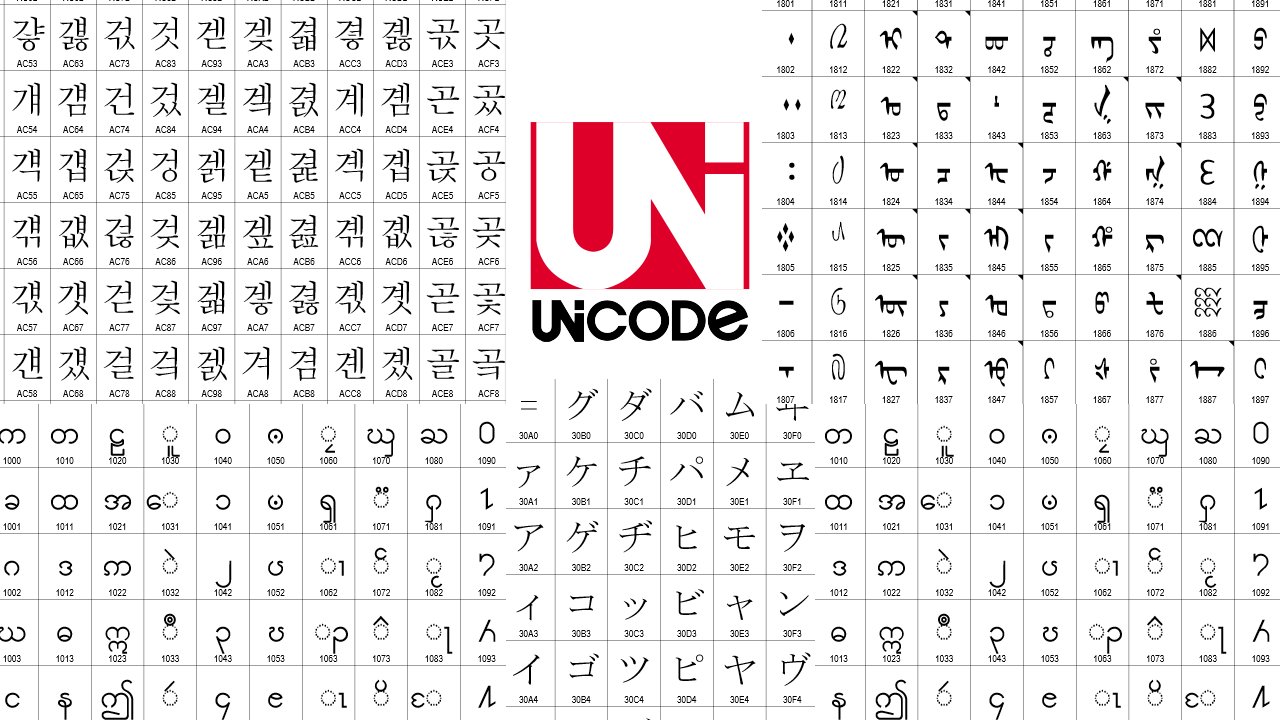
So later on, people invented Unicode to solve this issue. Unicode is the universal code for millions of different characters and hundreds of different character sets. It is able to store characters and emoji from various languages, thus having no trouble for the computer to understand.

UNICODE character chart

In conclusion, we got in touch with the computer ‘language’ this week—the binary system, as well as the brain of computer—the CPU. For me, I think learning Python would really help me to get a deeper understanding of the ASCII and UNICODE system because like Python3, all of the strings are in the UNICODE format and all of the programming are related to those character representation. It’s hard for me at this age to understand all the knowledge behind each of these terms, but I’ll still challenge myself in future courses! 


Citation
  1. wikiHow. “How to Convert from Binary to Decimal.” WikiHow, WikiHow, 29 Mar. 2018, http://www.wikihow.com/Convert-from-Binary-to-Decimal.
  2. wikiHow. “How to Convert from Decimal to Binary.” WikiHow, WikiHow, 14 May. 2018, http://www.wikihow.com/Convert-from-Decimal-to-Binary.
  3. Torres, Gabriel. “How a CPU Works.” Hardware Secrets, 4 Oct. 2018, http://www.hardwaresecrets.com/how-a-cpu-works/.

Computer System Blog (25/03/19)

This was the week that really stepped into some basic knowledge about computers. We finished up the blog website build-up process and personal database on Peteict. Later on, we started to get in touch with the computer hardware and software, as well as computing system. 

  • WordPress Blog

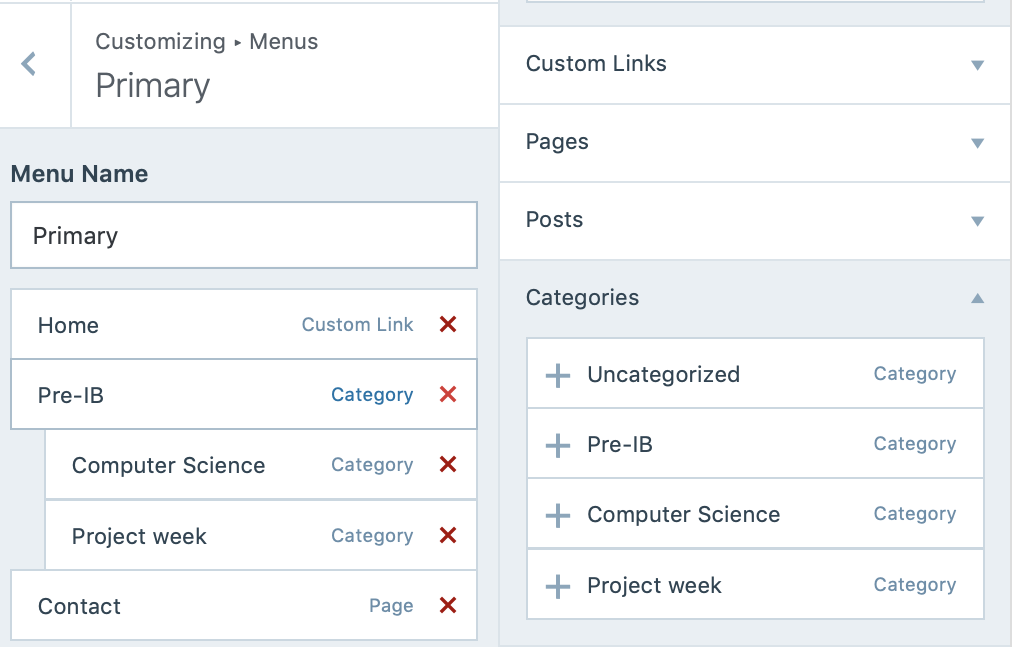
We learned how to set up blog sites. To be more specific, we got in touch with the idea of building up different categories and menus, allocating the previous posts into the right ‘position’. The images below are the categories that I set, where I put Computer Science and Project week under the folder Pre-IB. This way of dividing the posts into different categories will help us keep our blog website clean and organized.

The categories that I created on WordPress
  • What is a computer?

A computer includes three major aspects, computing system, hardware and software. The computing system is a basic, complete and functional computer, including all the hardware and software required to make it functional for a user. Hardware is the comprehensive term for all of the physical parts of a computer, for instance, keyboard, mouse and monitor, etc. While the software stands for the programs used to direct the computers, any app in the APP store is given as an example. 

  • Computer History

Later on, we saw the video from Youtube that introduced the history of computer. It took several decades to develop the first fully functioning computer. The conclusion is that it was not a single person who invented the computer, but many people keep innovating, exploring, and influencing each other to make the first computer. 

  • Layers of Computing System

As mentioned above, computing system combines hardware and software and data all together to interact with each other to solve the problems or the commands from the user. The innermost part is information layer. Information on a computer is all represented by using binary digits, which is 0 and 1. The second layer is hardware, which is the physical element that controls the flow of electricity inside the device. The programming layer, which comes next, give instructions to the system to accomplish computations and also the management of data. The purpose of the next layer, operating system, is to manage the way that hardware, software and data interact with each other, for instance, the most well-known operating systems are Mac OS X, Linux and Windows. Application and communication layer are more related to our daily life, because they assist the computers to accomplish the real-world issues and connect into the networks. From the point of view of my personal experience, the building process of robotics fits into this computing system layer. We build the structure and the electric circuits first, which is part of the hardware. Afterwards, in order to accomplish the mission that we want this robot to do, we give programs to the robot, which commands the robot what to do next. We give the robot input, which is how we control our joystick, it processes the meaning of our commands and shows the movement as a form of output.

  • The IPO Model

The IPO model is a widely used approach in system analysis and software engineering for describing the structure of an information processing program and this explains how computers accomplish their functions. This model includes three parts, input, processing and output. Input can be regarded as a requirement from the environment, it’s generally known as the commands that the users give to the system. Process in this IPO model is a computation process based on the commands given by the user, for instance, the calculation of numbers. An output from the system is the result from input and process. This ensures that the system can link back to its external environment and respond to the user. In class, we did an activity that is to give a real-life example to this model. We choose Siri as an example, its input can be regarded as the voice or text from the user, what Siri does next is to process the meaning of the sentence and look up what to response in the database. Finally, as a form of output, the answer from Siri would be appeared on the screen. 

The IPO Model
  • Computer Hardware—Presentation

We learned how to use Zoho do online presentations this week. The way that Zoho works is similar to the WordPress Blog website, which is that the information won’t be published until you click the button, and a html link will be automatically created to share the slides to others. From my point of view, I think this way of cooperating together was innovative and efficient, it saves quite a lot of time for us, all of the team members can do the slides online simultaneously at home, rather than sitting altogether. I think I would use it more frequently in the future for other projects or presentations. Our team was in charge of presentation of processing in the computer hardware—the CPU. It was hard at first because we totally have no idea where to start, we were not sure that whether we should focus on the components of CPU or the examples of CPU. After reading the rubrics and all the information from reliable websites, we divide our topic into four different parts, CU, ALU, Register and Clock. I’m very glad to work with those teammates, our group was very cohesive and they are very cooperative and reliable. This presentation activity helped me to dive deeper into computer hardware and broaden my view of computer.

https://show.zohopublic.com/publish/d3m2vace5da91cff94338a4d08c42cdbe4bc4

In a word, this week starts to introduce the basic knowledge of computers and we learned lots of useful skills that can be used in real life. After seeing the exhibition of computer components at the back of the classroom, I am quite curious about the inner structure of the computer. So maybe sometime during vacation, I will try to disassemble the computer and explore something more about its CPU and other components.


Introductory Blog (05/03/2019)

The robot for 2018 FRC season
The robot for 2019 FRC season
  • Self introduction

To begin by briefly introducing myself, I am a great fan of a variety of sports, for instance, baseball, soccer, tennis, etc. (Love Yankees!!!FC Barcelona!!!) Additionally, areas related to robotics, artificial intelligence attract me a l lot. I have been participating in competitions (FRC,FTC,FGC,CRC) and research related to robotics for approximately 2 years, this is amazing because it stimulates my interests to discover the relationship between programming and structural design, for instance, how are we going to use programming to achieve the goal that the robot will be able to lift up a block autonomously, or how can we successfully code the robot that it can move anywhere we want with any given speed? Apart from that, during spare time, listening to pop music, hanging out with friends, travelling around would be my primary choices. 

  • Expectations

As for the expectations for the Pre-IB CS course in the following semester, firstly I am eager to learn some knowledge about the structure of computer, and how does the system work in case if there are some issues with the computer, I am able to fix it myself. Secondly, I hope that I can get in touch with some basic theory about the high-tech systems, internet construction and technological equipment these days, because modern technologies such as cloud computing, image recognition are developing rapidly and becoming increasingly important in our daily lives, thus it would be great for us to know the theory behind. Thirdly, I always want to build my own server/website, where I can put my experiences on robotics and AI on and also some information that I am interested in. But it’s difficult to build such a website, so I hope I can learn this in CS class, probably not in this semester, but in the G11&12.

Looking forward to this Pre-IB CS course!!! ^_^

Technology has forever changed the world we live in. We’re online, in one way or another, all day long. Our phones and computers have become reflections of our personalities, our interests, and our identities. They hold much that is important to us.

——James Comey

https://www.brainyquote.com/quotes/james_comey_727946