
We learned some basics about computing components last year in grade 10. In the past few weeks, we dig deeper into the CPU and learn its structure and how data flows in CPU.
Input, process, storage, and output concept

The only thing, compared to the IPO model that we learned previously, that adds to this diagram is the storage part. Storage part enables computers to either store the data in storage or fetch data from it during processing step.
The main term for this unit is the CPU. The central processing unit is the key component of the computer because it contains circuitry that can interpret and execute program instructions.
Main components of a CPU
- Control unit (CU): It is like the commander of the CPU that decodes instructions and controls other components for example ALU
- ALU: It is the core of the CPU that carries out arithmetic and logical calculations for example AND, OR and NOT.
- Registers: Registers are fast temporary storage inside the CPU. Also, by using different logic gates, CU decode instructions into signals; then, it directs data flow and operation of the ALU.

Primary and Secondary Memory
Primary memory directly connects to CPU, which includes register, cache, RAM, ROM, and also virtual memory. (Register will be discussed later in this post)
- RAM: it stands for random access memory, which contains addresses representing instructions, numbers, and letters. The data stored in RAM can be overwritten. However, RAM is a volatile memory, which means the data will lost if power is turned off.
- ROM: Read-only memory. ROM is used to store data that cannot be overwritten. ROM is non-volatile memory, and because the data stored cannot be changed, it’s mainly used to store data that do not need to be updated.
- Cache memory: Cache memory is small in size, it has high speed and used to hold frequently used data inside the CPU. It can also be known as SRAM (static RAM). There are three different levels of Cache: L1, L2 and L3. L1 Cache is usually inside the CPU, it’s small and can be fast to access. L2 and L3 Cache are bigger in size and takes longer time to access. Cache memory saves fetching the instructions and data repeatedly from RAM so that it can speed up the process.
We later on compared RAM and Cache memory in class.
Virtual Memory:
- A type of memory technique that utilizes storage available on a machine to free up spaces in RAM to store more data. With virtual memory, the computer is able to look for areas of RAM that have not been read or written recently.
- Virtual memory uses secondary memory to extend the capacity of Primary memory.
Secondary memory(or can also be called as auxiliary storage) are non-volatile memory that includes HDD/SDD (Hard disk drive and Solid state drive), Flash, and CD/DVD. Here are come characteristics of secondary memory:
- Slower speed compared to primary memory
- Higher capacity
- Not directly connected to CPU
- Cannot function without the existence of primary memory
The need for persistent memory
Persistent memory is necessary and important for the computer. Because primary memory can only be used temporarily, which means data will disappear from the computer when the power is turned off.
Later on we talked about the booting process.
- Fire up power
- Look for address in BIOS
- BIOS starts checking
- If everything is OK, finds hard drive and finds operating system
- Loads up kernel to the RAM
- Kernel loads up operating system
- GUI (graphic user interface)
There are five registers inside the CPU
- MAR: MAR stands for memory address register, which is a one-way register that contains address that is currently being read or written.
- MDR: MDR stands for memory data register, which is a two-way register that contains data that is fetched from memory or is to be stored in the memory.
- Accumulator: It holds the immediate result of the ALU.
- Program counter: It holds the memory address of the next instruction
- Current instruction register (CIR): The memory that was just fetched from the memory and currently being decoded by CU.

Through this connection, CPU fetches data from memory, performs instructions, and stores information back to memory.
In class, we watched a video on Youtube about how computer CPU works.

CPU reads memory:
1. CPU sends address to the RAM
2. CPU turns on the enable wire
3. RAM sends data of that address back to CPU through data bus
CPU writes memory:
1. CPU sends address
2. CPU sends data
3. CPU turns on set wire
4. RAM replaces original addresses with new data
Machine instruction cycle
Machine Instruction Cycle can depict the process of how CPU runs a computer program:
- Fetch instruction from primary memory to CU
MAR –>Primary memory–>CU - Decode instruction in CU
Fetch additional data if needed
- ALU executes instruction
- Store results in the memory and continue the cycle

Little man computer and programming in Assembly language:
Little man computer is a website that can test our understanding of the working process of CPU. We use assembly language to perform arithmetic calculations in LMC.
The left column is the place where we write code, and the right column shows the step, instruction, and correspondent registers. The right side of the graph contains input, output, CPU (containing program counter, IR, address register, and accumulator), ALU, and 100 registers.
When writing code, we use stipulated abbreviation to represent instructions:
- Inp: input
- Sta: store data to specific register
- Add: add number in accumulator with data that is stored previously into the register
- Out: output
- Hlt: halt. Stop the program
- Dat: data. We need to write “a sta” to tell the computer that “a” is a data.
- LDA: standing for “load”, which instructs CPU to load and store data being fetched from specific register into accumulator.
TASK 1: A + B + C: I input A as 1, B as 2, and C as 3.
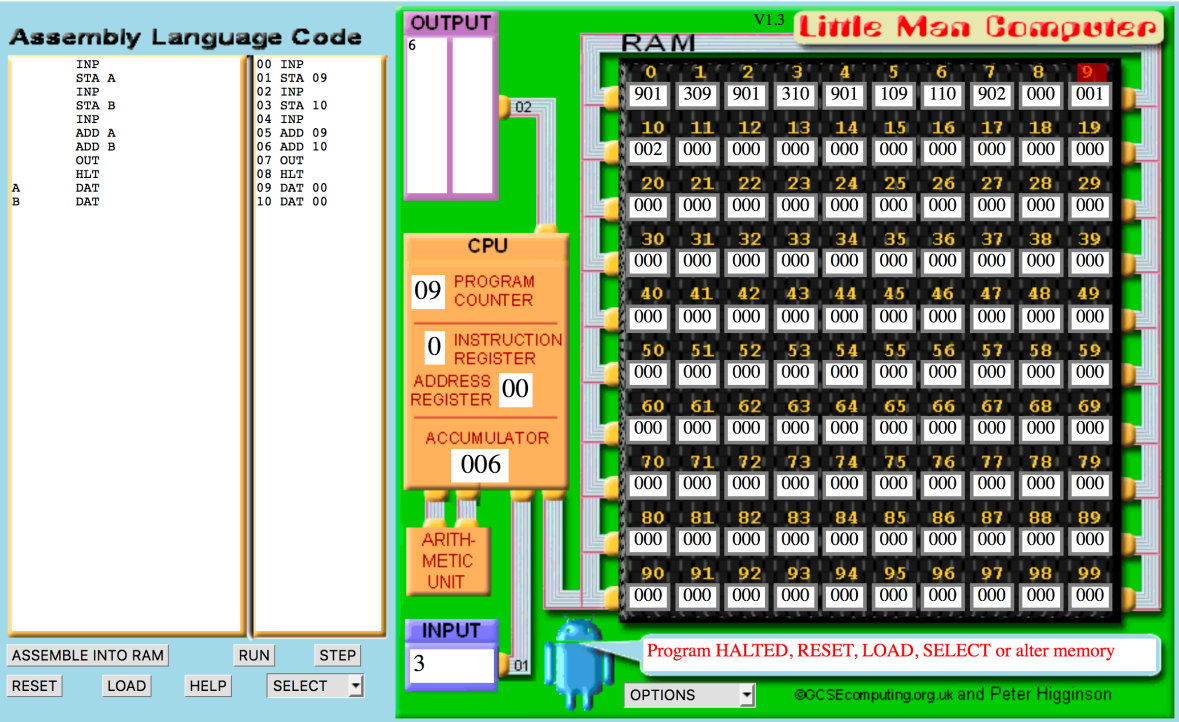
TASK 2:(A+B) + (B+C): A is 1; B is 3; C is 5; D is the sum of A and B
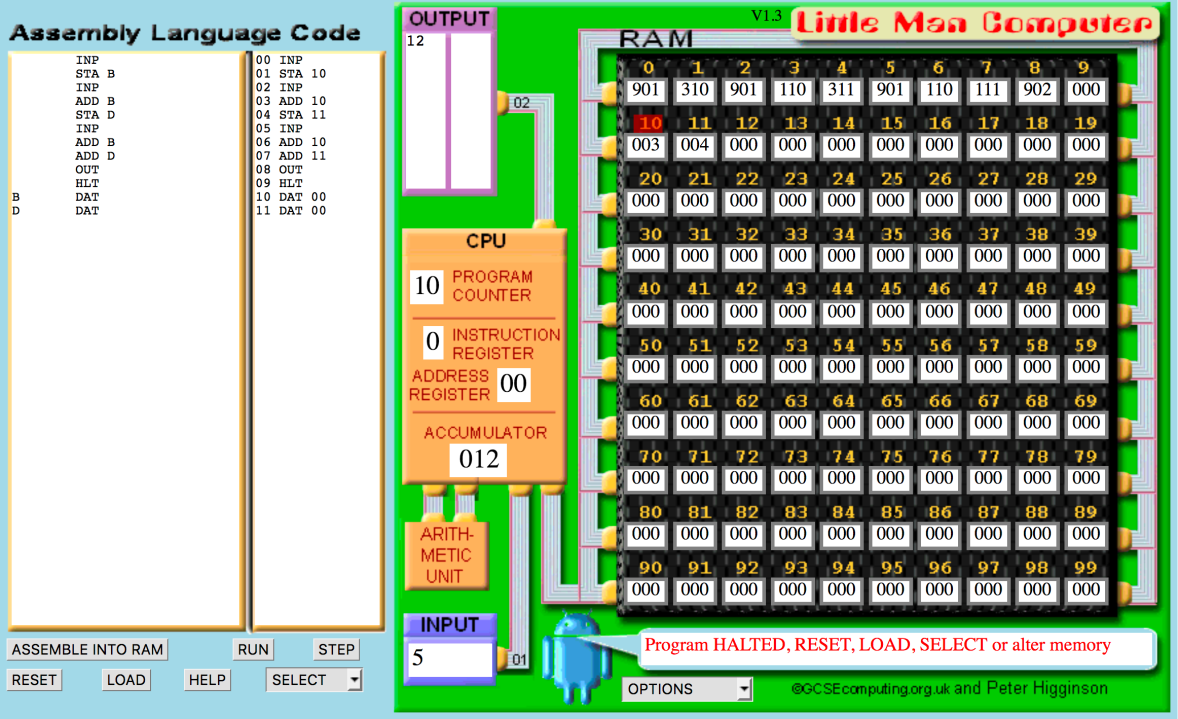
TASK 3: A multiply B

TASK4: A divided by B

To sum up, compared to grade 10, we dig much deeper into how CPU works ,we finally know how exactly the computer receives input, generates data flow, and outputs results. And this is the part that I thinkI need to constantly spend time to review in the future. The LMC activity is really fun!! Looking forward to JAVA!!!
 Johnson's blog