
This week we mainly focused on data representation, to be more specific, how to convert numbers to different bases; how does computer store the information and data.
We start off by introducing the categorization of numbers, in which consists of natural number, negative number, integers, rational number, and irrational number, and real number. But computers does not involve much with irrational numbers.

Positional notation: Based on different bases, different numbers will have different value for their digit number and value of digit positions.
For example, decimal number 145, 1 is on the third position, 4 on the second position, and 5 is on the first position.
Here is the formula:

Because of the positional notation depends on different base, there are binary numbers (base 2), octal numbers (base 8), decimal numbers (base 10), and hexadecimal numbers (base 16).
- Decimal is base 10 and has 10 numbers: 0, 1, 2, 3, 4, 5, 6, 7, 8, 9
- Binary is base 2 and has 0, 1
- Hexadecimal is base 16 and has 10 numbers and 6 letters: 0, 1, 2, 3, 4, 5, 6, 7, 8, 9, A, B, C, D, E, F. Letters A to F represent 10 to 15 repectively.
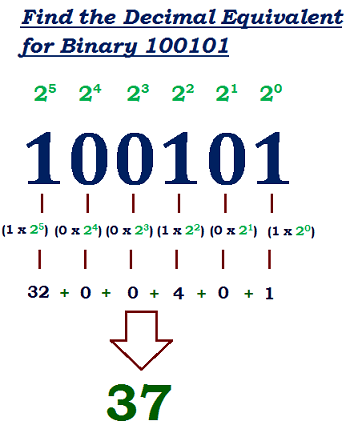
if we want to convert a number from other bases to decimal, we use the equation mentioned above.
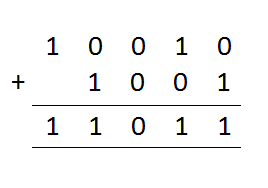
Arithmetic in Binary:
Just as same as doing calculations in decimal, binary arithmetic will also include carry and borrow.
Converting binary to octal and hexadecimal
It is related to the power of two. We all know that 8 is equal to 2 to the power of 3, and 16 is the power of 4. when we want to convert binary to octal or hexadecimal, we can simply divide all the numbers (binary) into 3 or 4 in a group, and then convert them. For example, converting 011010110 into octal.

Converting decimal to other bases
- Divide the decimal number by the new base
- Place the remainder at the right
- Write the remainder from bottom to top
An example is given below:

ACTIVITY

Crossbin 1 
Crossbin 2
BITS and BYTE
The storage units for computer is called binary digits, or bits. When we are referring to speed of sending and receiving information, we use bits.When referring to volume, we use byte.
Byte = 8 Bits

Representing negative values — Two’s complement
- Use 8-bit register to firstly convert the decimal value into binary (the 8thposition is reserved for positive or negative sign)
- Replace all 1s with 0s and 0s with 1s for the first 7 positions
- Add 1 (first 7 positions)
- Change the 8thposition from 0 to 1 to have the negative sign

Representing natural numbers
In order to prevent overflow (bits are more than computer can process), computers store data in fixed-size chunks, which conventionally is 8 bits. We can simply convert decimal number in to binary when we are storing natural number.
Data Representation
In computer science, we kept learning what exactly is a computer. A computer is not only a machine that can process the data from input and provide output, but also a multimedia that can represent and store various types of media by using binary digits. For example, texts, image, audio, video, etc.
- Analog data: A continuous representation of actual information in daily life. For example, if we want to record the change of the hight of surface of water, because the data is constantly changing, it’s continuous.
- Digital data: A discrete representation of data, which breaks information to separate elements. Digital data only has high and low state, corresponding to the binary digits.
In addition, in order to let computer “understands” analog signals, we digitize them, breaking them down and representing them separately.

Representing Text:
- Character sets: Characters and codes to represent each other
- ASCII character set: American Standard Code for Information Interchange. Originally uses 7 bits, allowing 128 characters. Later on it evolved to 8 bits.
- Unicode character set: uses 16 bits per character, allowing more characters to be involved and represented.
Representing Image:
- Bitmap
- Vector
- Colour depth
- Resolution
- Metadata

Representing Audio:
- Sample rate
- Bit depth
- Bit rate
- Codecs
Converting analog audio to digital
- Pulse code modulation
- Sampling
- Quantization
- Encoding
Compression
- Reduce space required
- Faster transfer
- Encoding using fewer bits
- Compression ratio: Size of compressed data over original data
| Lossy | Lossless |
| Does not return data to original content | Returns data to original content |
| Information loss is tolerable | No reduce in quality |
| Used by images, videos | Used by databases, emails |
| JPEG, MP3 | Huffman, Run-Length |
Compression advantage:
- Storage
- Speed
- Protection
- File transfer
- Archiving
- Keyword encoding: replace constantly appearing patterns with special characters.
- Run-length encoding: replace repeated sequence with a flag. e.g. *c6kkk*o8
- Huffman encoding: listed in decreasing order of use. Use a tree to represent.


Activity 
Activity
Poster assignment
The end of this unit is to create a poster that includes all the crucial information in data representation. I am in charge of numbers and a part of character, as well as the connection between those two. It was quite hard to put all those separate information and keywords together and connected at first, so we spend quite a long time on planning and designing. But eventually, we still miss some keywords and definitions, as well as it is not very visually attractive. (We forgot to take a picture of our poster)
Conclusion
This unit is quite important for future understanding of more complex topics. Because computers heavily rely on representing data in binary, as well as compression of data. I believe those knowledge will be a foundation for future learning.
^_^
 Johnson's blog